One AI use case that keeps coming up for us at rwQUANTICAL is the classification of customer inquiries with AI in customer service.
Clients want inquiries that arrive by email or through portals to be read, classified and then processed automatically.
Before LLMs were released, tasks like this were often hard to implement. Classic software had a limited understanding of language. Different phrasings had to be caught with keywords, rules or custom logic.
Modern language models have made this much easier.
This article shows how companies can process customer inquiries with a local AI and feed the results into automation chains. As an example, we use the open-source model Laya.
Why use a local AI for customer inquiries?
Of course, customer inquiries can also be processed with ChatGPT, Claude or another large language model. For pure classification, such a model is often larger than necessary.
A company may only want to know whether a new inquiry should go to legal, support or accounting. It may also want to detect how urgent the inquiry is or which process should be started next.
For this task, a model does not need to write long texts, code or solve complex problems. It needs to turn inputs into structured outputs.
The multilingual version of Laya, which also handles German text, has around 322 million parameters and is very small compared to large language models. In tests on a MacBook Air, the model ran without issues. This makes it suitable for smaller local systems, and first tests do not require a large GPU infrastructure.
Local operation matters most when data is sensitive. Customer inquiries can be processed inside your own infrastructure and do not have to be sent to OpenAI, Anthropic or any other external provider for classification.
Then there is cost. Commercial LLM APIs charge tokens for every request. With a local model, the main costs are your own hardware and infrastructure. With a large number of small classifications, that can make a relevant difference.
Another advantage is the output. These processes rarely need written answers. They need concrete data.
A customer inquiry can, for example, be classified by department, priority and cancellation risk:
{
  "department": "support",
  "priority": "high",
  "cancellation_risk": true
}
The next application can work with this data directly.
How does Laya work?
Laya first receives the text of an inquiry. For example:
Hello, since this morning we have not been able to log in to our customer portal. We urgently need access because we have to create invoices today.
You also define which information you need from the inquiry. In this example, the model should determine the responsible department, the urgency and the cancellation risk.
The result could look like this:
Department: Support
Probability: 96 %

Priority: High
Probability: 91 %

Cancellation risk: Low
Probability: 98 %
A regular email has turned into structured information that other software can process.
Adapting Laya to your own use case
A first test does not require fine-tuning. Start by checking how well the existing model performs on real inquiries from your own company.
A few hundred historical customer inquiries are enough for this. They are labeled manually once with the desired categories. You can then compare how often Laya reaches the same decision.
Fine-tuning becomes relevant for company-specific categories. A general model does not automatically know the exact internal distinction between SAP support, AMS, change request, incident or a new project inquiry.
Even then, you do not necessarily need thousands of examples. A small, cleanly labeled dataset can be enough for a first attempt. Afterwards, you review the errors and add more examples where they are needed.
Keep part of the existing inquiries out of training. You can use this data later to test whether fine-tuning actually improved the detection rate.
Processing customer inquiries with n8n or Power Automate
Classification is only one part of the process. Something has to happen with the result.
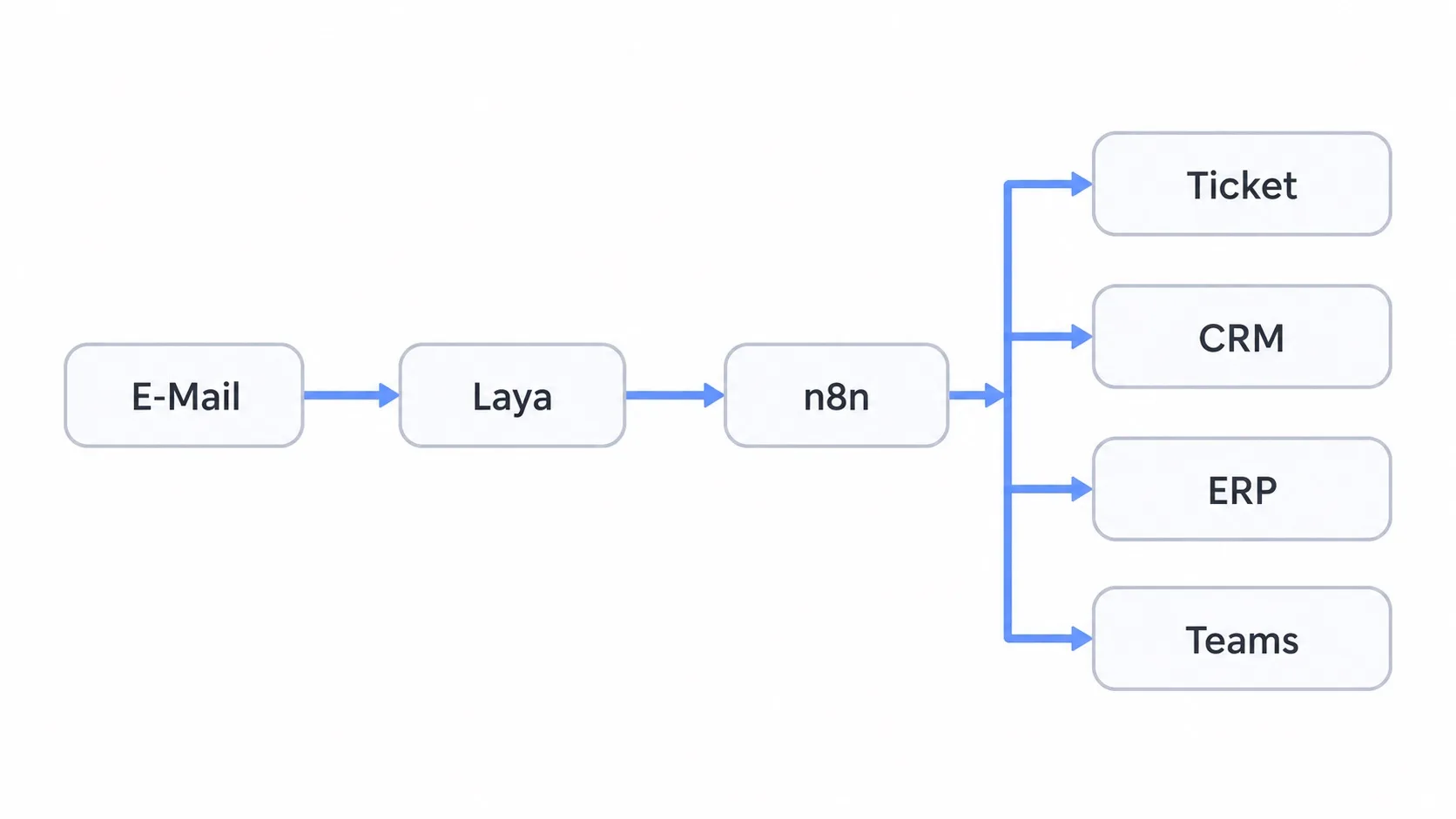
A new email can, for example, be picked up from Microsoft 365 or Gmail and sent to a locally running Laya API. Laya returns the detected category. n8n, Power Automate or a custom application then processes this information.
If the category support comes back, a ticket can be created automatically. A sales
inquiry can be added to the CRM as a lead. Invoices can be passed on to the matching process in
the ERP.
For a high-priority inquiry, a message in Microsoft Teams or Slack could be triggered as well.
In this setup, Laya only classifies the inquiry. The actual business logic stays in the workflow.
This makes sense in practice because the processes stay controllable. The model decides, for example, that an inquiry is a support request. Which actions follow a support request is still clearly defined in the process.
When is a larger LLM the better choice?
Laya is most useful for clearly defined decisions.
If a system needs to compare several documents, write an individual reply to a customer or analyze a complex case, a larger model such as GPT or Claude is usually the better fit.
Both models can also be used within the same process.
Laya first classifies the incoming inquiry. Simple cases are automated directly. Only when a certain category or level of complexity is detected is the inquiry also handed to a larger LLM.
This way, not every incoming email has to go through a large model.
Another use case: classifying leads before they are worked on
A similar setup works in sales.
Before a sales rep picks up a new lead, several pieces of information can already be extracted from the inquiry.
Does the inquiry match your service offering? Is there a concrete project? Is a timeframe mentioned? Are there signs of budget or urgency?
From an email or a contact form, Laya could produce the following information:
Matches service offering: Yes
Concrete project: Yes
Timeframe mentioned: Yes
Budget mentioned: No
Priority: High
This information can then be passed automatically to HubSpot or another CRM.
A lead score can be built on top of it. The score should not simply be made up by the language model. Define fixed rules instead.
A concrete project might give 30 points, short-term demand 20 points and a company from the defined target group another 20 points.
The model is then only responsible for recognizing the necessary information in the text. The scoring follows normal business rules.
An inquiry such as “We are looking for short-term support with an SAP FI migration” can be recognized directly as a concrete project inquiry and ranked higher in the CRM than a general request for information.
Which processes is Laya suited for?
Laya is most interesting where many texts are processed but the same few pieces of information are needed every time.
These can be customer inquiries, support tickets, leads, documents or internal requests.
Large LLMs can handle these tasks too. But if you only need three or four fields in the end, it is worth checking whether a large language model is really needed every time.
A small local model can be a simple alternative for these classifications and can then be connected to existing systems such as n8n, Power Automate, HubSpot or your own ERP.